Project: Gas3
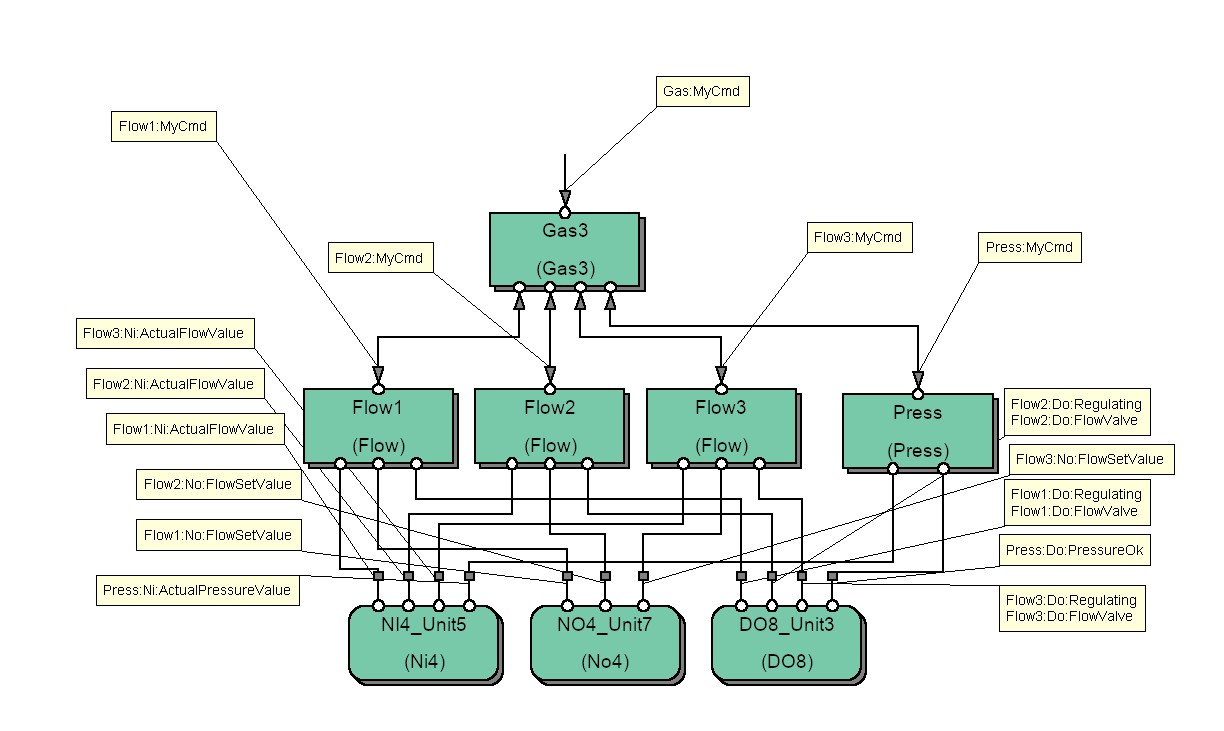
VFSM type: CMD(predefined vfsm)
Object name: Flow1:MyCmd
| Properties | |
| Name | Value |
| Type | flow |
Object name: Flow2:MyCmd
| Properties | |
| Name | Value |
| Type | flow |
Object name: Flow3:MyCmd
| Properties | |
| Name | Value |
| Type | flow |
Object name: Gas:MyCmd
| Properties | |
| Name | Value |
| Type | gas3 |
Object name: Press:MyCmd
| Properties | |
| Name | Value |
| Type | press |
VFSM type: TI(predefined vfsm)
Object name: Flow1:Ti:Busy
| Properties | |
| Name | Value |
| Const | 10 |
| Clock | sec |
Object name: Flow1:Ti:Opening
| Properties | |
| Name | Value |
| Const | 3 |
| Clock | sec |
Object name: Flow2:Ti:Busy
| Properties | |
| Name | Value |
| Const | 10 |
| Clock | sec |
Object name: Flow2:Ti:Opening
| Properties | |
| Name | Value |
| Const | 3 |
| Clock | sec |
Object name: Flow3:Ti:Busy
| Properties | |
| Name | Value |
| Const | 10 |
| Clock | sec |
Object name: Flow3:Ti:Opening
| Properties | |
| Name | Value |
| Const | 3 |
| Clock | sec |
Object name: Press:Ti:Busy
| Properties | |
| Name | Value |
| Const | 8 |
| Clock | sec |
VFSM type: AL(predefined vfsm)
Object name: Flow1:Al:OpeningError
| Properties | |
| Name | Value |
| Category | 0 |
| Text | Opening too long |
Object name: Flow1:Al:RegulatingError
| Properties | |
| Name | Value |
| Category | 0 |
| Text | Flow not OK |
Object name: Flow2:Al:OpeningError
| Properties | |
| Name | Value |
| Category | 0 |
| Text | Opening too long |
Object name: Flow2:Al:RegulatingError
| Properties | |
| Name | Value |
| Category | 0 |
| Text | Flow not OK |
Object name: Flow3:Al:OpeningError
| Properties | |
| Name | Value |
| Category | 0 |
| Text | Opening too long |
Object name: Flow3:Al:RegulatingError
| Properties | |
| Name | Value |
| Category | 0 |
| Text | Flow not OK |
Object name: Press:Al:PressureNotOk
| Properties | |
| Name | Value |
| Category | 0 |
| Text | Pressure not OK |
VFSM type: DO(predefined vfsm)
Object name: Flow1:Do:FlowValve
Object name: Flow1:Do:Regulating
Object name: Flow2:Do:FlowValve
Object name: Flow2:Do:Regulating
Object name: Flow3:Do:FlowValve
Object name: Flow3:Do:Regulating
Object name: Press:Do:PressureOk
VFSM type: NO(predefined vfsm)
Object name: Flow1:No:FlowSetValue
| Properties | |
| Name | Value |
| Format | float |
| Unit | V |
| ScaleMode | Lin |
| ScaleFactor | 1.5 |
| Offset | 0 |
| OutData | Flow1:Par:FlowSetValue |
Object name: Flow2:No:FlowSetValue
| Properties | |
| Name | Value |
| Format | float |
| Unit | V |
| ScaleMode | Lin |
| ScaleFactor | 1.5 |
| Offset | 0 |
| OutData | Flow1:Par:FlowSetValue |
Object name: Flow3:No:FlowSetValue
| Properties | |
| Name | Value |
| Format | float |
| Unit | V |
| ScaleMode | Lin |
| ScaleFactor | 1.5 |
| Offset | 0 |
| OutData | Flow1:Par:FlowSetValue |
VFSM type: NI(predefined vfsm)
Object name: Flow1:Ni:ActualFlowValue
| Properties | |
| Name | Value |
| Format | float |
| Unit | V |
| ScaleMode | Lin |
| ScaleFactor | 0.2 |
| Offset | 0 |
| Threshold | 0 |
Object name: Flow2:Ni:ActualFlowValue
| Properties | |
| Name | Value |
| Format | float |
| Unit | V |
| ScaleMode | Lin |
| ScaleFactor | 0.2 |
| Offset | 0 |
| Threshold | 0 |
Object name: Flow3:Ni:ActualFlowValue
| Properties | |
| Name | Value |
| Format | float |
| Unit | V |
| ScaleMode | Lin |
| ScaleFactor | 0.2 |
| Offset | 0 |
| Threshold | 0 |
Object name: Press:Ni:ActualPressureValue
| Properties | |
| Name | Value |
| Format | short |
| Unit | mBar |
| ScaleMode | Exp |
| ScaleFactor | 0.005 |
| Offset | 0 |
| Threshold | 0 |
VFSM type: SWIP(predefined vfsm)
Object name: Flow1:Swip:FlowRange
| Properties | |
| Name | Value |
| Input | Flow1:Ni:ActualFlowValue |
| LimitLow | 200 |
| LimitHigh | 240 |
Object name: Flow2:Swip:FlowRange
| Properties | |
| Name | Value |
| Input | Flow2:Ni:ActualFlowValue |
| LimitLow | 200 |
| LimitHigh | 240 |
Object name: Flow3:Swip:FlowRange
| Properties | |
| Name | Value |
| Input | Flow3:Ni:ActualFlowValue |
| LimitLow | 200 |
| LimitHigh | 240 |
Object name: Press:Swip:Pressure
| Properties | |
| Name | Value |
| Input | Press:Ni:ActualPressureValue |
| LimitLow | 5 |
| LimitHigh | 7 |
VFSM type: PAR(predefined vfsm)
Object name: Flow1:Par:FlowSetValue
| Properties | |
| Name | Value |
| Category | PP |
| Format | float |
| Unit | V |
| LimitLow | 300 |
| LimitHigh | 700 |
| InitValue | 500 |
Object name: Flow2:Par:FlowSetValue
| Properties | |
| Name | Value |
| Category | PP |
| Format | float |
| Unit | V |
| LimitLow | 300 |
| LimitHigh | 700 |
| InitValue | 500 |
Object name: Flow3:Par:FlowSetValue
| Properties | |
| Name | Value |
| Category | PP |
| Format | float |
| Unit | V |
| LimitLow | 300 |
| LimitHigh | 700 |
| InitValue | 500 |
VFSM type: CNT(predefined vfsm)
Object name: Flow1:Cnt:FlowRangeExceeds
| Properties | |
| Name | Value |
| Const | 4 |
Object name: Flow2:Cnt:FlowRangeExceeds
| Properties | |
| Name | Value |
| Const | 4 |
Object name: Flow3:Cnt:FlowRangeExceeds
| Properties | |
| Name | Value |
| Const | 4 |
VFSM type: Flow(user vfsm)
Flow
-------
Flow controls a gas flow attenuator. The Flow state machine accepts commands (numbers) and sets an analog signal Ao and a digital signal Do. As a feedback from the attenuator the state machine receives the actual gas flow values as an analog signal Ai and a digital signal Di indicating the attenuator position (open/closed). Three commands determine attenuator operations:
1: open the gas flow by setting the High value of the digital output Do,
2: close the gas flow by setting the Low value of the digital output Do,
3: set the gas flow to the value determined by the numerical output Ao.
Opening the flow valve is supervised by a timer TimO. If the valve does not open before the TimO timer expires an alarm AlaO is generated.
The gas flow actual value is reached some time after setting the gas flow value and it is supervised by a timer TimR. If the gas flow value does not reach the set value before the TimR timer expires an alarm AlaR is generated.
The actual gas flow is measured and its value delivered as an analog input signal Ai to the control system. Normally, it is required that the flow value stays within a certain limits. If the flow value exceeds the required range the state machine should after some delay issue an alarm and count this event. If it happens more than a certain number the state machine should issue immediately the alarm if the flow value exceeds the range. This last situation signalled to a Master by a state FlowNotOK.
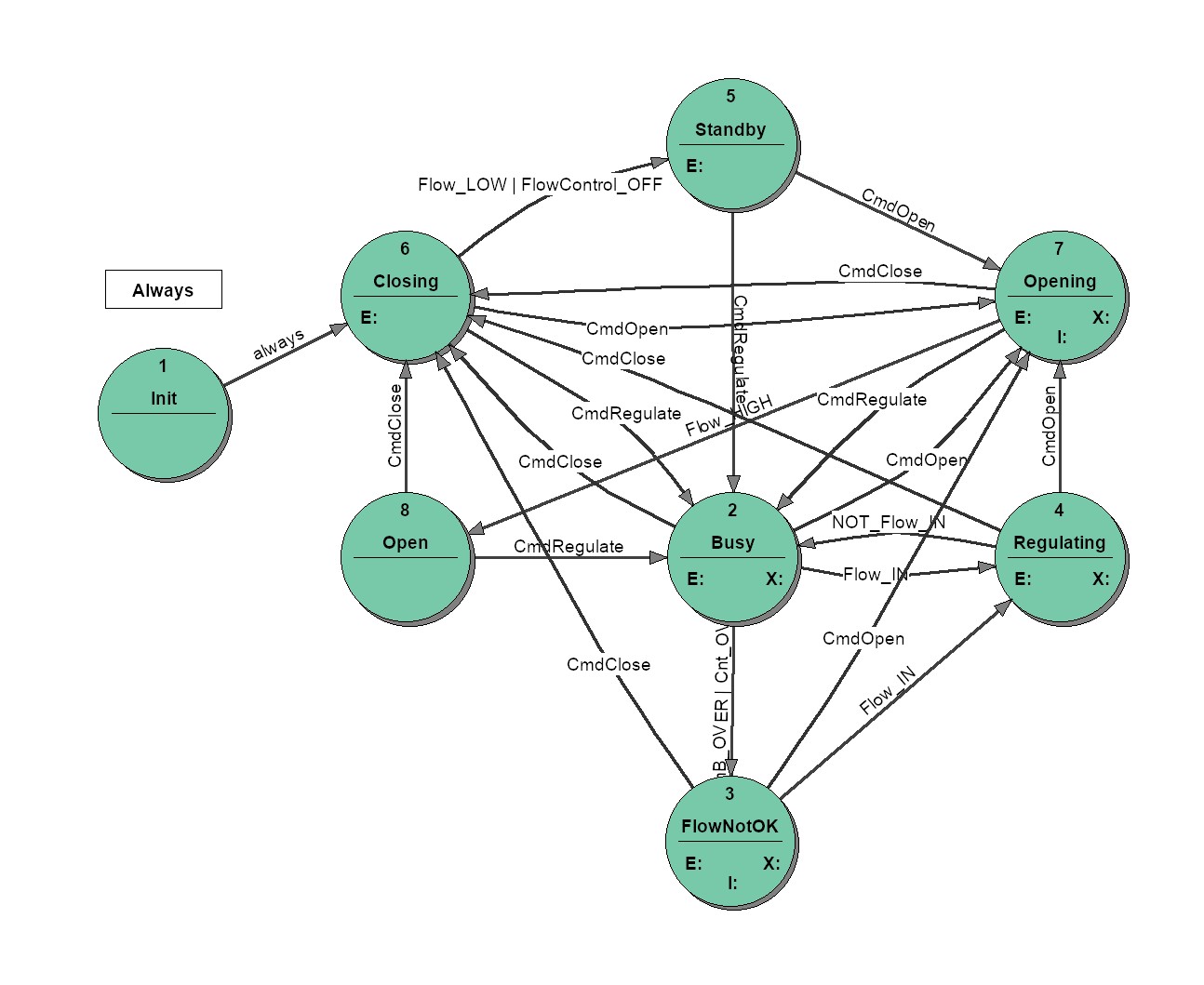
Prefix: FLO
Object name: Flow1
| Properties | |
| Name | Value |
| MyCmd | Flow1:MyCmd |
| TimB | Flow1:Ti:Busy |
| TimO | Flow1:Ti:Opening |
| AlaO | Flow1:Al:OpeningError |
| AlaR | Flow1:Al:RegulatingError |
| DoRegulating | Flow1:Do:Regulating |
| DoValve | Flow1:Do:FlowValve |
| Ao | Flow1:No:FlowSetValue |
| Ai | Flow1:Ni:ActualFlowValue |
| SwipF | Flow1:Swip:FlowRange |
| Cnt | Flow1:Cnt:FlowRangeExceeds |
Object name: Flow2
| Properties | |
| Name | Value |
| MyCmd | Flow2:MyCmd |
| TimB | Flow2:Ti:Busy |
| TimO | Flow2:Ti:Opening |
| AlaO | Flow2:Al:OpeningError |
| AlaR | Flow2:Al:RegulatingError |
| DoRegulating | Flow2:Do:Regulating |
| DoValve | Flow2:Do:FlowValve |
| Ao | Flow2:No:FlowSetValue |
| Ai | Flow2:Ni:ActualFlowValue |
| SwipF | Flow2:Swip:FlowRange |
| Cnt | Flow2:Cnt:FlowRangeExceeds |
Object name: Flow3
| Properties | |
| Name | Value |
| MyCmd | Flow3:MyCmd |
| TimB | Flow3:Ti:Busy |
| TimO | Flow3:Ti:Opening |
| AlaO | Flow3:Al:OpeningError |
| AlaR | Flow3:Al:RegulatingError |
| DoRegulating | Flow3:Do:Regulating |
| DoValve | Flow3:Do:FlowValve |
| Ao | Flow3:No:FlowSetValue |
| Ai | Flow3:Ni:ActualFlowValue |
| SwipF | Flow3:Swip:FlowRange |
| Cnt | Flow3:Cnt:FlowRangeExceeds |
IOid name: MyCmd
(type: CMD-IN)
-->Virtual Input: CmdClose
(2)
-->Virtual Input: CmdOpen
(1)
-->Virtual Input: CmdRegulate
(3)
IOid name: TimB
(type: TI)
-->Virtual Input: TimB_OVER
(OVER)
-->Virtual Output: TimB_ResetStart
(ResetStart)
-->Virtual Output: TimB_Stop
(Stop)
IOid name: TimO
(type: TI)
-->Virtual Input: TimO_OVER
(OVER)
-->Virtual Output: TimO_ResetStart
(ResetStart)
-->Virtual Output: TimO_Stop
(Stop)
IOid name: AlaO
(type: AL)
-->Virtual Output: AlaO_Coming
(Coming)
-->Virtual Output: AlaO_Going
(Going)
IOid name: AlaR
(type: AL)
-->Virtual Output: AlaF_Coming
(Coming)
-->Virtual Output: AlaF_Going
(Going)
IOid name: DoRegulating
(type: DO)
-->Virtual Output: BadFlow
(Low)
-->Virtual Output: RegulatingFlow
(High)
IOid name: DoValve
(type: DO)
-->Virtual Output: CloseFlow
(Low)
-->Virtual Output: OpenFlow
(High)
IOid name: Ao
(type: NO)
-->Virtual Output: ResetFlowValue
(Off)
-->Virtual Output: SetFlowValue
(On)
IOid name: Ai
(type: NI)
IOid name: SwipF
(type: SWIP)
-->Virtual Input: FlowControl_OFF
(OFF)
-->Virtual Input: Flow_HIGH
(HIGH)
-->Virtual Input: Flow_IN
(IN)
-->Virtual Input: Flow_LOW
(LOW)
-->Virtual Input: NOT_Flow_IN
(~IN)
-->Virtual Output: FlowSupervision_Off
(Off)
-->Virtual Output: FlowSupervision_On
(On)
IOid name: Cnt
(type: CNT)
-->Virtual Input: Cnt_OVER
(OVER)
-->Virtual Output: Cnt_Inc
(Inc)
-->Virtual Output: Cnt_ResetStart
(ResetStart)
State transition table, state '
Init
':
Init |
EntryAction:
| |
ExitAction:
| ||
Closing
| always |
State transition table, state '
Busy
':
Busy |
EntryAction:
| FlowSupervision_On SetFlowValue TimB_ResetStart Cnt_Inc |
ExitAction:
| TimB_Stop | |
Closing
| CmdClose | |
FlowNotOK
|
TimB_OVER or Cnt_OVER
| |
Opening
| CmdOpen | |
Regulating
| Flow_IN |
State transition table, state '
FlowNotOK
':
FlowNotOK |
EntryAction:
| AlaF_Coming |
ExitAction:
| AlaF_Going | |
Flow_IN | AlaF_Going | |
Closing
| CmdClose | |
Opening
| CmdOpen | |
Regulating
| Flow_IN |
State transition table, state '
Regulating
':
Regulating |
EntryAction:
| RegulatingFlow |
ExitAction:
| BadFlow | |
Closing
| CmdClose | |
Opening
| CmdOpen | |
Busy
| NOT_Flow_IN |
State transition table, state '
Standby
':
Standby |
EntryAction:
| FlowSupervision_Off Cnt_ResetStart |
ExitAction:
| ||
Opening
| CmdOpen | |
Busy
| CmdRegulate |
State transition table, state '
Closing
':
Closing |
EntryAction:
| CloseFlow ResetFlowValue FlowSupervision_On |
ExitAction:
| ||
Standby
|
Flow_LOW or FlowControl_OFF
| |
Opening
| CmdOpen | |
Busy
| CmdRegulate |
State transition table, state '
Opening
':
Opening |
EntryAction:
| FlowSupervision_On ResetFlowValue OpenFlow TimO_ResetStart Cnt_ResetStart |
ExitAction:
| TimO_Stop | |
TimO_OVER | AlaO_Coming | |
Flow_HIGH | AlaO_Going | |
Open
| Flow_HIGH | |
Closing
| CmdClose | |
Busy
| CmdRegulate |
State transition table, state '
Open
':
Open |
EntryAction:
| |
ExitAction:
| ||
Closing
| CmdClose | |
Busy
| CmdRegulate |
Total number of states: 8
VFSM type: Press(user vfsm)
Press
--------
PRES state machine does not perform any true control - it does not have any output like Do or No. It rather supervisers the pressure and represents the result to the Master with its state.
The actual pressure value delived by numerical input Ai is controlled by a switchpoint SwipPress and by a Timer. If the measurement is on the timer is started. If the timer expires before the pressure (Ai) reaches the required range Press signals the bad pressure with it state and issues an alarm. If the pressure returns to the required value Press signals it with its state. Thus, during measurement Press changes among states: Busy, PressOK and BadPress signalling to the Master the pressure value.
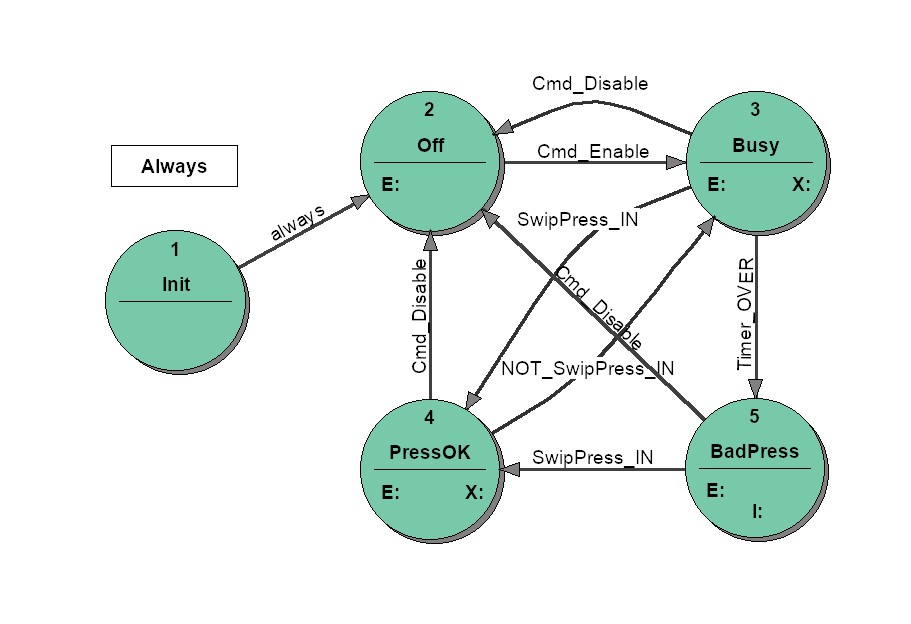
Prefix: PRE
Object name: Press
| Properties | |
| Name | Value |
| MyCmd | Press:MyCmd |
| Timer | Press:Ti:Busy |
| Alarm | Press:Al:PressureNotOk |
| Do | Press:Do:PressureOk |
| Ai | Press:Ni:ActualPressureValue |
| SwipPress | Press:Swip:Pressure |
IOid name: MyCmd
(type: CMD-IN)
-->Virtual Input: Cmd_Disable
(2)
-->Virtual Input: Cmd_Enable
(1)
IOid name: Timer
(type: TI)
-->Virtual Input: Timer_OVER
(OVER)
-->Virtual Output: Timer_ResetStart
(ResetStart)
-->Virtual Output: Timer_Stop
(Stop)
IOid name: Alarm
(type: AL)
-->Virtual Output: Alarm_Coming
(Coming)
-->Virtual Output: Alarm_Going
(Going)
IOid name: Do
(type: DO)
-->Virtual Output: Di_PressureNotOk
(Low)
-->Virtual Output: Di_PressureOk
(High)
IOid name: Ai
(type: NI)
IOid name: SwipPress
(type: SWIP)
-->Virtual Input: NOT_SwipPress_IN
(~IN)
-->Virtual Input: SwipPress_IN
(IN)
-->Virtual Output: SwipPress_Off
(Off)
-->Virtual Output: SwipPress_On
(On)
State transition table, state '
Init
':
Init |
EntryAction:
| |
ExitAction:
| ||
Off
| always |
State transition table, state '
Off
':
Off |
EntryAction:
| SwipPress_Off |
ExitAction:
| ||
Busy
| Cmd_Enable |
State transition table, state '
Busy
':
Busy |
EntryAction:
| SwipPress_On Timer_ResetStart |
ExitAction:
| Timer_Stop | |
PressOK
| SwipPress_IN | |
BadPress
| Timer_OVER | |
Off
| Cmd_Disable |
State transition table, state '
PressOK
':
PressOK |
EntryAction:
| Di_PressureOk |
ExitAction:
| Di_PressureNotOk | |
Busy
| NOT_SwipPress_IN | |
Off
| Cmd_Disable |
State transition table, state '
BadPress
':
BadPress |
EntryAction:
| Alarm_Coming |
ExitAction:
| ||
SwipPress_IN | Alarm_Going | |
PressOK
| SwipPress_IN | |
Off
| Cmd_Disable |
Total number of states: 5
VFSM type: Gas3(user vfsm)
Gas
------
The state machine controls a gas inlet of a vacuum chamber. It does not do it directly but is a Master of two Slave state machines: Flow and Press which effectively control the hardware. Gas "sees" only the two state machines and coordinates their activity.
The Press state machine represents through its state the pressure value. The Press state values interesting for Gas are: Off, BadPress and PressOK.
The Flow state machine represents through its state the gas flow value. The Flow state values interesting for Gas are: Busy, Regulating and Standby.
If Press is in the state PressOK and Flow in the state Regulating Gas should be in the state OK which signals the required situation in the control system.
Gas controls the Slaves by sending them commands: Close/Regulate to Flow and Disable/Enable to Press.
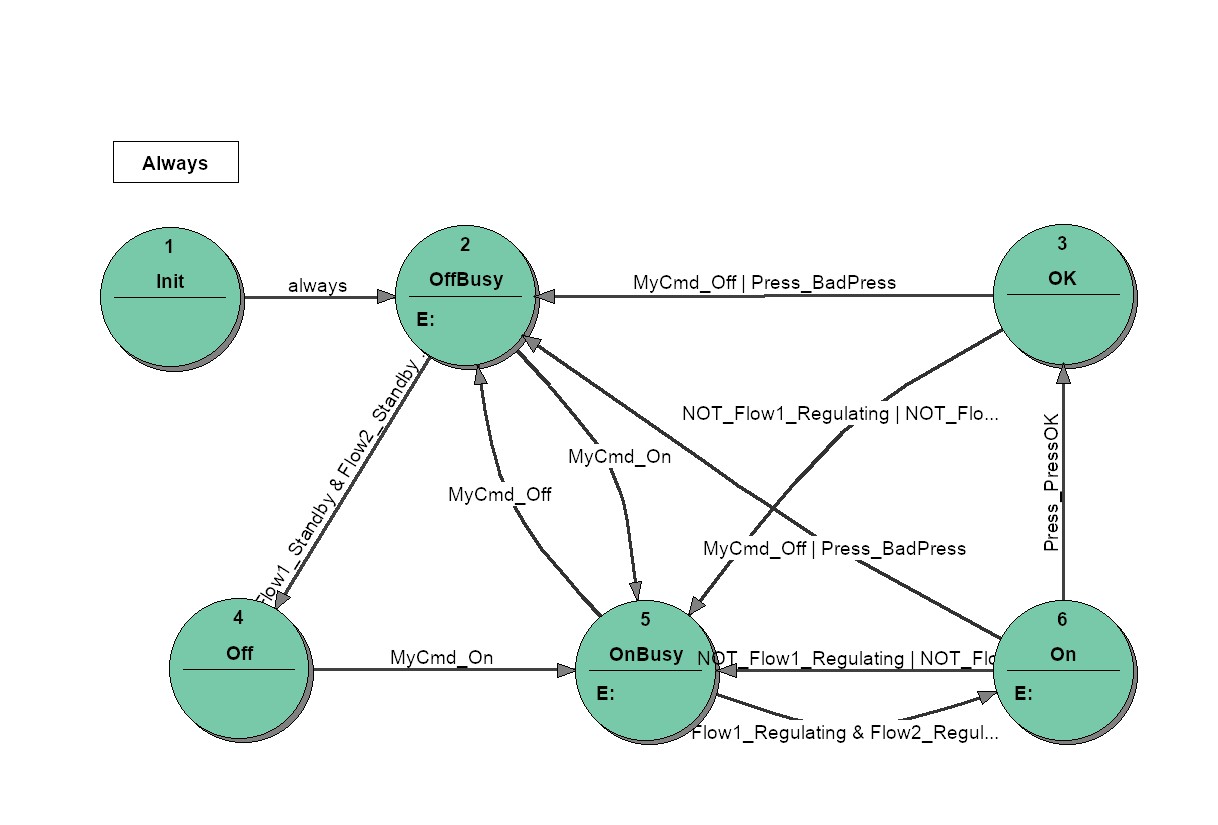
Prefix: GAS
Object name: Gas3
| Properties | |
| Name | Value |
| MyCmd | Gas:MyCmd |
| Flow1 | Flow1 |
| Flow2 | Flow2 |
| Flow3 | Flow3 |
| Press | Press |
| Flow1Cmd | Flow1:MyCmd |
| Flow2Cmd | Flow2:MyCmd |
| Flow3Cmd | Flow3:MyCmd |
| PressCmd | Press:MyCmd |
IOid name: MyCmd
(type: CMD-IN)
-->Virtual Input: MyCmd_Off
(1)
-->Virtual Input: MyCmd_On
(2)
-->Virtual Output: MyCmd_Clear
(0)
IOid name: Flow1
(type: VFSM)
flow
-->Virtual Input: Flow1_Regulating
(
Regulating
)
-->Virtual Input: Flow1_Standby
(
Standby
)
-->Virtual Input: NOT_Flow1_Regulating
(
~Regulating
)
IOid name: Flow2
(type: VFSM)
flow
-->Virtual Input: Flow2_Regulating
(
Regulating
)
-->Virtual Input: Flow2_Standby
(
Standby
)
-->Virtual Input: NOT_Flow2_Regulating
(
~Regulating
)
IOid name: Flow3
(type: VFSM)
flow
-->Virtual Input: Flow3_Regulating
(
Regulating
)
-->Virtual Input: Flow3_Standby
(
Standby
)
-->Virtual Input: NOT_Flow3_Regulating
(
~Regulating
)
IOid name: Press
(type: VFSM)
press
-->Virtual Input: Press_BadPress
(
BadPress
)
-->Virtual Input: Press_Off
(
Off
)
-->Virtual Input: Press_PressOK
(
PressOK
)
IOid name: Flow1Cmd
(type: CMD-OUT)
flow
-->Virtual Output: Flow1Cmd_Close
(2)
-->Virtual Output: Flow1Cmd_Regulate
(3)
IOid name: Flow2Cmd
(type: CMD-OUT)
flow
-->Virtual Output: Flow2Cmd_Close
(2)
-->Virtual Output: Flow2Cmd_Regulate
(3)
IOid name: Flow3Cmd
(type: CMD-OUT)
flow
-->Virtual Output: Flow3Cmd_Close
(2)
-->Virtual Output: Flow3Cmd_Regulate
(3)
IOid name: PressCmd
(type: CMD-OUT)
press
-->Virtual Output: PressCmd_Disable
(2)
-->Virtual Output: PressCmd_Enable
(1)
State transition table, state '
Init
':
Init |
EntryAction:
| |
ExitAction:
| ||
OffBusy
| always |
State transition table, state '
OffBusy
':
OffBusy |
EntryAction:
| Flow1Cmd_Close Flow2Cmd_Close Flow3Cmd_Close PressCmd_Disable |
ExitAction:
| ||
Off
|
Flow1_Standby and Flow2_Standby and Flow3_Standby and Press_Off
| |
OnBusy
| MyCmd_On |
State transition table, state '
OK
':
OK |
EntryAction:
| |
ExitAction:
| ||
OffBusy
|
MyCmd_Off or Press_BadPress
| |
OnBusy
|
NOT_Flow1_Regulating or NOT_Flow2_Regulating or NOT_Flow3_Regulating
|
State transition table, state '
Off
':
Off |
EntryAction:
| |
ExitAction:
| ||
OnBusy
| MyCmd_On |
State transition table, state '
OnBusy
':
OnBusy |
EntryAction:
| Flow1Cmd_Regulate Flow2Cmd_Regulate Flow3Cmd_Regulate PressCmd_Disable MyCmd_Clear |
ExitAction:
| ||
OffBusy
| MyCmd_Off | |
On
|
Flow1_Regulating and Flow2_Regulating and Flow3_Regulating
|
State transition table, state '
On
':
On |
EntryAction:
| PressCmd_Enable |
ExitAction:
| ||
OnBusy
|
NOT_Flow1_Regulating or NOT_Flow2_Regulating or NOT_Flow3_Regulating
| |
OK
| Press_PressOK | |
OffBusy
|
MyCmd_Off or Press_BadPress
|
Total number of states: 6
VFSM type: Ni4(unit)
Prefix: NI4
Object name: NI4_Unit5
| Properties | |
| Name | Value |
| CommPort | 0 |
| PhysAddr | 5 |
| Ni0 | Press:Ni:ActualPressureValue |
| Ni1 | Flow1:Ni:ActualFlowValue |
| Ni2 | Flow2:Ni:ActualFlowValue |
| Ni3 | Flow3:Ni:ActualFlowValue |
IOid name: Ni0
(type: NI)
IOid name: Ni1
(type: NI)
IOid name: Ni2
(type: NI)
IOid name: Ni3
(type: NI)
VFSM type: No4(unit)
Prefix: NO4
Object name: NO4_Unit7
| Properties | |
| Name | Value |
| CommPort | 0 |
| PhysAddr | 7 |
| No0 | Flow1:No:FlowSetValue |
| No1 | Flow2:No:FlowSetValue |
| No2 | Flow3:No:FlowSetValue |
| No3 | |
IOid name: No0
(type: NO)
IOid name: No1
(type: NO)
IOid name: No2
(type: NO)
IOid name: No3
(type: NO)
VFSM type: DO8(unit)
Prefix: DOU
Object name: DO8_Unit3
| Properties | |
| Name | Value |
| CommPort | 0 |
| PhysAddr | 3 |
| Do0 | Press:Do:PressureOk |
| Do1 | Flow1:Do:Regulating |
| Do2 | Flow2:Do:Regulating |
| Do3 | Flow3:Do:Regulating |
| Do4 | Flow1:Do:FlowValve |
| Do5 | Flow2:Do:FlowValve |
| Do6 | Flow3:Do:FlowValve |
| Do7 | |
IOid name: Do0
(type: DO)
IOid name: Do1
(type: DO)
IOid name: Do2
(type: DO)
IOid name: Do3
(type: DO)
IOid name: Do4
(type: DO)
IOid name: Do5
(type: DO)
IOid name: Do6
(type: DO)
IOid name: Do7
(type: DO)