
IO-Handler C++ Example
Description
Section titled “Description”The TcpipClient directory (can be found in the StateWORKS projects folder) contains an example of a IO-Handler connecting to an RTDB based application as a client of RTDB TCP/IP server. This example is written in C++ under Visual Studio 2008. The code demonstrates the use of functions available in the TcpipClient.dll. The the corresponding dll file is also available.
The example is written for a simple StateWORKS specification project named IO_Example.
To make it simple the example uses the implicit call of the dll. Therefore, the project contains the TcpipClient.lib. The code demonstrates the following:
InitializeRTDBServerConnection()using the functionInitialize():- initializes the callback function
RepEv()that is called by events coming from the RTDB server; - connects to RTDB server using the function
Connect(), - registers as a client of outputs
RawDataproperty in the RTDB using theAdviseStart().
- initializes the callback function
- The callback function
RepEv()may receive theRawDatavalues ofDo:001andNo:001or the information that the RTDB server exited. - The
OnBnClickedCheckDi1()andOnEnKillfocusEditNi1()use the functionPoke()to write correspondingly theRawDatavalue of digital inputDo:001and numerical inputNo:001into the RTDB. - The
OnDestroy()uses theDisConnect()while terminating the application.
The example shows the use of commonly used dll functions. The other functions are:
Receive() which delivers the requested value. Its use is straightforward: at any time we can use the function to get a certain property from the RTDB.
AdviseStop() is seldom explicitly used; it is used inside the function Disconnect().
To test the IO_CppExample you have to start the SWExecStandard.exe.
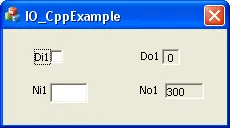
Figure 1: IO_CppExample dialog window
Starting this program the first time you will be asked to enter the specification file to be executed. For the purpose of that example we use:
C:\Programs\SWSoftware\StateWORKS Studio Basic 7.2\Projects\Examples-Web\IO_Example\Conf\IO_Example.swdThe path and the file are stored in the file .RTDB_Conf.par and on consecutive starts the program will use the specification file stored there. If you want to start the program with another specification file delete the .RTDB_Conf.par or start the program with a -cName parameter.
Now you may start the IO-Handler file IO_CppExample.exe. The dialog window as in Figure 1 appears. The window shows a digital input Di1, a digital output Do1, a numerical (analog) input Ni1 and a numerical (analog) output No1.
You will need to use the SWMon for testing. Once started, set it to display the inputs and outputs of interest. Setting inputs Di1 and Ni1 you watch the effects in SWMon and vice-versa – changes of Do1 and No1 in SWMon are displayed in IO_CppExample window.